Turn Team Knowledge Into Instant Answers.
Kbixy helps teams create, organize, and find information faster with semantic AI search, AI-assisted knowledge creation, searchable video, and branded knowledge portals.
No credit card required • Free forever plan available
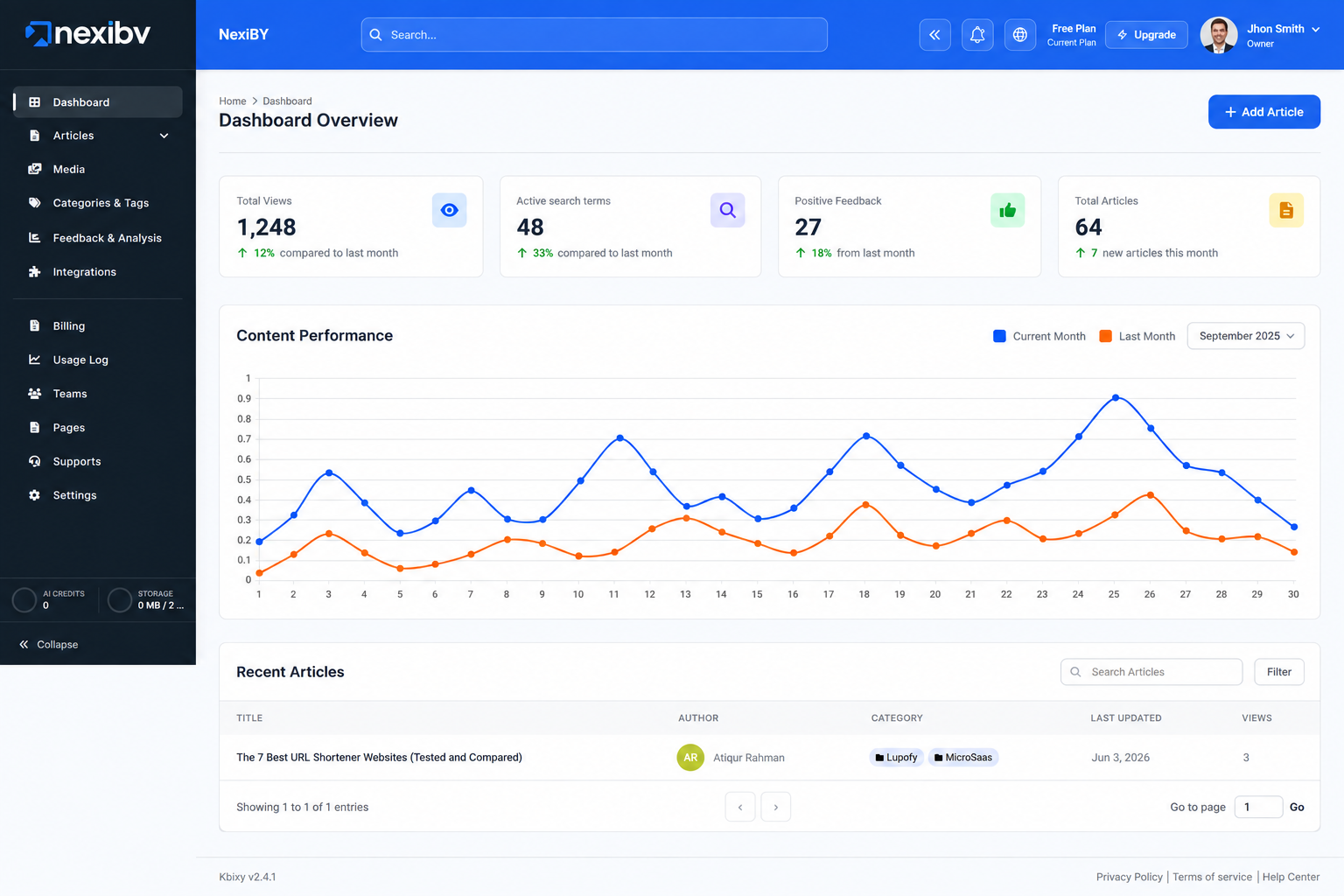
Trusted by modern teams building smarter knowledge systems

Everything You Need To Build A Smarter Knowledge Base
Kbixy brings search, writing, video, branded portals, and useful analytics together in one simple workspace.
Powerful Search
Semantic AI search understands meaning, not just keywords. Find relevant answers across articles and video transcripts without digging through pages of content.
“Customers can request a full refund within 30 days of purchase. Pro-rated refunds apply thereafter upon team review.”
AI Knowledge Creation
Create article drafts, summaries, and tags with AI. Format content faster with slash commands like /h1, /video, and /code without interrupting your workflow.
Company Subdomain
Give your company a branded knowledge space at yourcompany.kbixy.com with your own logo, hero banner, and navigation. Custom domains are also available.
Video Recorder & Transcription
Record your screen or camera directly from your browser. Kbixy transcribes your recording and makes the content searchable alongside the rest of your knowledge base.
“...and to trigger the deployment, simply push your branch to the staging remote...”
Analytics & Feedback
Track article views, searches, and helpful ratings to understand what your team uses most, what they are looking for, and where knowledge may be missing.
Your company knowledge is everywhere. Your answers shouldn’t be.
Kbixy brings scattered information into one organized, searchable system so your team spends less time looking and more time getting things done.



One Clear Source Of Truth
Bring your team's knowledge together and use semantic search to find relevant answers when you need them.
More powerful features for modern teams
Structure, controls, and visibility for running a real company knowledge system.
Granular permissions, without the complexity
Invite Admins, Editors, and Viewers with role-based access. Control who can manage the workspace, create and edit content, or simply access the knowledge they need.
Share every article on your terms
Keep sensitive information private, protect selected content for specific audiences, or publish knowledge publicly when needed. You stay in control of who sees what.
Tailored for every department
One knowledge platform for HR, support, engineering, sales, operations, finance, legal, and product teams.
HR & Onboarding
Make Onboarding Easier From Day One
Create a self-service knowledge hub for company policies, role-specific documentation, onboarding guides, processes, and welcome videos.
Pro tip: Record a quick welcome, training session, or process walkthrough and make it searchable for every new team member.
Customer Support
Give Support Teams Answers They Can Trust
Organize troubleshooting guides, FAQs, support processes, and internal answers so agents can find the information they need and resolve customer issues faster.
Pro tip: Turn frequently resolved customer issues into reusable knowledge articles so the whole support team can benefit from the solution.
Engineering
Keep Technical Knowledge Within Reach
Document technical processes, architecture, development standards, release notes, code examples, and recorded walkthroughs in one searchable place.
Pro tip: Record complex setup or debugging processes while you work, then make the transcript searchable for the rest of your engineering team.
Sales & Marketing
Keep Everyone On Message
Organize sales playbooks, campaign guidelines, messaging, training materials, brand resources, and product information so teams always have the latest material.
Pro tip: Build a shared library of product FAQs, positioning, and objection-handling notes that sales teams can reference before customer conversations.
Operations
Turn Processes Into Shared Knowledge
Centralize SOPs, recurring workflows, internal procedures, and process documentation so your team knows how work should be done.
Pro tip: Record step-by-step walkthroughs for operational processes that are easier to demonstrate than explain in a long document.
Finance
Keep Financial Processes Clear And Organized
Store financial procedures, expense policies, approval workflows, reporting guides, and department FAQs in a controlled knowledge hub.
Pro tip: Create simple guides for recurring tasks such as expense submissions, invoice approvals, reimbursements, and internal reporting.
Legal & Compliance
Keep Important Policies Easy To Find
Organize policies, compliance documentation, legal procedures, privacy guidelines, and sensitive internal information with controlled access.
Pro tip: Use article visibility and workspace permissions to restrict sensitive documentation to the people who need access.
Product & Design
Keep Product Knowledge Connected
Bring product requirements, design guidelines, research insights, feature specifications, product decisions, and team walkthroughs together in one searchable place.
Pro tip: Document the reasoning behind important product and design decisions so future team members understand both what was decided and why.
How Kbixy Works
Capture, organize, and find company knowledge without adding unnecessary process.
Capture Effortlessly
Record your screen, write with fast slash commands, or upload existing documents. Kbixy makes capturing knowledge simple.
AI Organizes & Writes
Use AI to transcribe videos, draft articles and summaries, and suggest tags so your knowledge stays easier to organize.
Find Answers Instantly
Ask questions in plain English. Kbixy's semantic search finds relevant information across articles and searchable video transcripts.
See How Kbixy Compares
Traditional tools help store information. Kbixy brings knowledge creation, AI-powered search, video, permissions, and insights together in one workspace.
Loved by high-performing teams
Here's how teams use Kbixy to keep important knowledge organized and accessible.
“We switched from three different tools to just Kbixy and haven't looked back. The AI search alone makes finding information effortless for our entire team.”
“Onboarding new team members is so much smoother now. I just point them to our Kbixy library and they can find answers independently. Absolute lifesaver.”
“I was skeptical at first, but the AI summaries are genuinely useful. It pulls out the key moments so I don't have to rewatch entire meetings.”
Pick A Plan. Build Smarter.
Start free and choose a plan that grows with your team, knowledge, and usage.
Loading packages…
Frequently Asked Questions
Everything you need to know before building your team's knowledge base with Kbixy.
Contact UsTurn Your Team's Knowledge
Into Instant Answers.
Build a knowledge base your team will actually use with AI search, AI-assisted writing, and searchable video.
No credit card required • Set up in minutes
AI-POWERED KNOWLEDGE BASE
Turn Team Knowledge Into Instant Answers.
Kbixy helps teams create, organize, and find information faster with semantic AI search, AI-assisted knowledge creation, searchable video, and branded knowledge portals.
Start Free
View A Demo
No credit card required
Free forever plan available

Video Processed
Auto-Transcription
Instant Answer Generated
Semantic search
Trusted by modern teams building smarter knowledge systems
CORE FEATURES
Everything You Need To Build A Smarter Knowledge Base
Kbixy brings search, writing, video, branded portals, and useful analytics together in one simple workspace.
Powerful Search
Semantic AI search understands meaning, not just keywords. Find relevant answers across articles and video transcripts without digging through pages of content.
Customers can request a full refund within 30 days of purchase. Pro-rated refunds apply thereafter upon team review.
AI Knowledge Creation
Create article drafts, summaries, and tags with AI. Format content faster with slash commands like /h1, /video, and /code without interrupting your workflow.
Quarterly planning guide
Saved
GETTING STARTED
How to run quarterly planning
Insert with AI
Continue writing
Improve this section
Generate tags
Company Subdomain
Give your company a branded knowledge space at yourcompany.kbixy.com with your own logo, hero banner, and navigation. Custom domains are also available.
● ● ●
acme.kbixy.com
A
How can we help?
Search Acme knowledge
Getting started
Policies & benefits
Product guides
Video Recorder & Transcription
Record your screen or camera directly from your browser. Kbixy transcribes your recording and makes the content searchable alongside the rest of your knowledge base.
● 04:28
SR
Analytics & Feedback
Track article views, searches, and helpful ratings to understand what your team uses most, what they are looking for, and where knowledge may be missing.
12.4k
Searches (sample)
86%
Helpful rate (sample)
24
Knowledge gaps (sample)
Top unanswered search
“2026 parental leave policy” · 38 searches
Create article
WHY TEAMS SWITCH TO KBIXY
Your Company Knowledge Is Everywhere. Your Answers Shouldn't Be.
Kbixy brings scattered information into one organized, searchable system so your team spends less time looking and more time getting things done.
Slack
Where’s the latest policy?
Docs
Q4-plan-final-v7
Fwd: process notes
Videos
Untitled recording 42
One Clear Source Of Truth
Bring your team's knowledge together and use semantic search to find relevant answers when you need them.
One centralized, searchable hub
AI-assisted documentation
Searchable video transcripts
Faster self-service answers
BUILT TO SCALE WITH YOU
More Powerful Features For Modern Teams
Structure, controls, and visibility for running a real company knowledge system.
Granular Permissions, Without The Complexity
Invite Admins, Editors, and Viewers with role-based access. Control who can manage the workspace, create and edit content, or simply access the knowledge they need.
Role-based permissions
Workspace-level control
Secure content management
Workspace members
24 members
MC
Maya Chen
maya@acme.co
Admin
SR
Sam Rivera
sam@acme.co
Editor
JB
Jon Bell
jon@acme.co
Viewer
Article visibility
Public
Anyone can view
○
Protected
Link + password
●
Private
Workspace only
○
Share Every Article On Your Terms
Keep sensitive information private, protect selected content for specific audiences, or publish knowledge publicly when needed. You stay in control of who sees what.
Multiple visibility settings
Better content governance
Flexible sharing controls
HR & Onboarding
Make Onboarding Easier From Day One
Create a self-service knowledge hub for company policies, role-specific documentation, onboarding guides, processes, and welcome videos.
Pro tip: Record a quick welcome, training session, or process walkthrough and make it searchable for every new team member.
Customer Support
Give Support Teams Answers They Can Trust
Organize troubleshooting guides, FAQs, support processes, and internal answers so agents can find the information they need and resolve customer issues faster.
Pro tip: Turn frequently resolved customer issues into reusable knowledge articles so the whole support team can benefit from the solution.
Engineering
Keep Technical Knowledge Within Reach
Document technical processes, architecture, development standards, release notes, code examples, and recorded walkthroughs in one searchable place.
Pro tip: Record complex setup or debugging processes while you work, then make the transcript searchable for the rest of your engineering team.
Sales & Marketing
Keep Everyone On Message
Organize sales playbooks, campaign guidelines, messaging, training materials, brand resources, and product information so teams always have the latest material.
Pro tip: Build a shared library of product FAQs, positioning, and objection-handling notes that sales teams can reference before customer conversations.
Operations
Turn Processes Into Shared Knowledge
Centralize SOPs, recurring workflows, internal procedures, and process documentation so your team knows how work should be done.
Pro tip: Record step-by-step walkthroughs for operational processes that are easier to demonstrate than explain in a long document.
Finance
Keep Financial Processes Clear And Organized
Store financial procedures, expense policies, approval workflows, reporting guides, and department FAQs in a controlled knowledge hub.
Pro tip: Create simple guides for recurring tasks such as expense submissions, invoice approvals, reimbursements, and internal reporting.
Legal & Compliance
Keep Important Policies Easy To Find
Organize policies, compliance documentation, legal procedures, privacy guidelines, and sensitive internal information with controlled access.
Pro tip: Use article visibility and workspace permissions to restrict sensitive documentation to the people who need access.
Product & Design
Keep Product Knowledge Connected
Bring product requirements, design guidelines, research insights, feature specifications, product decisions, and team walkthroughs together in one searchable place.
Pro tip: Document the reasoning behind important product and design decisions so future team members understand both what was decided and why.
A SIMPLE SYSTEM
How Kbixy Works
Capture, organize, and find company knowledge without adding unnecessary process.
01
Capture Effortlessly
Record your screen, write with fast slash commands, or upload existing documents. Kbixy makes capturing knowledge simple.
02
AI Organizes & Writes
Use AI to transcribe videos, draft articles and summaries, and suggest tags so your knowledge stays easier to organize.
03
Find Answers Instantly
Ask questions in plain English. Kbixy's semantic search finds relevant information across articles and searchable video transcripts.
THE MODERN KNOWLEDGE STACK
See How Kbixy Compares
Traditional tools help store information. Kbixy brings knowledge creation, AI-powered search, video, permissions, and insights together in one workspace.
Feature
Traditional Wikis
Cloud Drives
Semantic AI Search
AI Drafting & Summaries
Built-in Screen Recorder
Video Transcription & Search
Branded Company Portal
Role-Based Permissions
Article Visibility Controls
Analytics
Testimonials
Loved By High-Performing Teams
Here's how teams use Kbixy to keep important knowledge organized and accessible.
“We switched from multiple disconnected tools to Kbixy. Bringing our documentation and video transcripts together made finding information seamless.”
JR
James R.
Product Manager
“Onboarding new team members is much smoother now. Having guides and walkthrough videos in one searchable library makes ramp-up effortless.”
AL
Anika L.
Head of People Ops
“The AI summaries and video transcripts are genuinely useful. It highlights the key points so our team can find what they need right away.”
DT
Daniel T.
Senior Engineer
PACKAGES & PRICING
Pick A Plan. Build Smarter.
Start free and choose a plan that grows with your team, knowledge, and usage.
Monthly
Annually
SAVE 20%
Free
$0/month
Perfect for individuals who want to start building a simple knowledge base.
Get Started Free
What's Included:
Custom Subdomain
Knowledge Base Articles (Up to 30)
Article Categories/Tags
Team Members (1 Admin)
File Attachments
Full-Text Search
Article Feedback (Helpful / Not Helpful)
AI Draft Writing & Tag Suggestions
AI-Powered Semantic Search
Analytics Dashboard
Built-in Screen/Video Recorder
AI Transcription & Search in Video
Priority Support
White-label (Logo + Domain)
Plus
Most Popular
$19/month
Ideal for small and growing teams that want AI-powered knowledge management.
Choose Plan
Save with yearly billing: $15.20/month
What's Included:
Custom subdomain
Knowledge Base Articles (Up to 500)
Article Categories/Tags
Team Members (Up to 5)
File Attachments
Article Feedback (Helpful / Not Helpful)
Full-Text Search
AI Draft Writing & Tag Suggestions
AI-Powered Semantic Search
Analytics Dashboard
White-label (Logo + Domain)
Built-in Screen/Video Recorder
AI Transcription & Search in Video
Priority Support
Pro
$49/month
Built for larger teams that need more capacity, flexibility, and control.
Choose Plan
Save with yearly billing: $39.20/month
What's Included:
Custom Subdomain
Knowledge Base Articles (Unlimited)
Article Categories/Tags
Team Members (Up to 20)
File Attachments
Article Feedback (Helpful / Not Helpful)
Full-Text Search
AI Draft Writing & Tag Suggestions
AI-Powered Semantic Search
Analytics Dashboard
Built-in Screen/Video Recorder
AI Transcription & Search in Video
Priority Support
White-label (Logo + Domain)
Answers before you start
Frequently asked questions
Everything you need to know before building your team's knowledge base with Kbixy.
Get Started
How Does AI Semantic Search Actually Work?
Unlike traditional keyword search, semantic search looks at the meaning and context behind your question. Kbixy searches your knowledge base to find relevant information across articles and supported video transcripts, even when your search doesn't use the exact same words.
Is My Company Data Secure And Private?
Can I Import My Existing Documentation?
How Do AI Drafting Credits Work?
Do You Offer Custom Domains For The Knowledge Base?
What Happens If I Exceed My Plan Limits?
GET STARTED TODAY
Turn Your Team's Knowledge
Into Instant Answers.
Build a knowledge base your team will actually use with AI search, AI-assisted writing, and searchable video.
Start Free
View A Demo
No credit card required • Set up in minutes
© 2026 Kbixy. All rights reserved.